
Pay Portal Help

How To Register on the Pay Portal
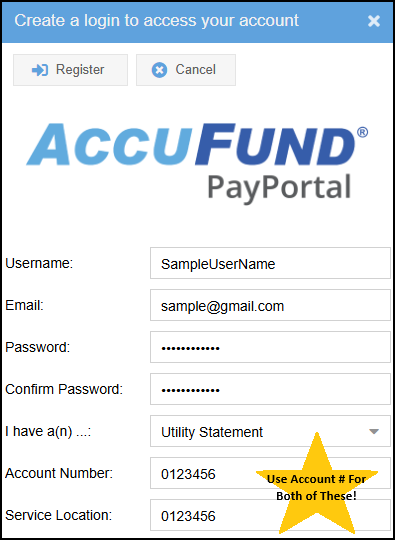
When registering, 'Service Location' is your 7 digit Account Number
Steps to Register
- Click this link Pay Portal by AccuFund
- Register
- Enter Username, Email and Password
- Utility Statement
- Account Number AND Service Location are the same; Use your 7 digit account number for both.
- Register
Now Login using the username & password you just created!
Need help? (503) 368-5125
How To Setup Autopay on the Pay Portal
Autopay
Your first payment will process on the 1st of next month. No late fees (hooray!) even if the 1st is after your due date. Future payments will process quarterly.
Autopay customers DO NOT receive statements. If you receive a statement, your Autopay needs attention.
Learn more about your bill here
Autopay Set Up
- Click Manage Credit Cards
- +Add Credit Card
- Enter Nickname (optional)
- Important! Click the small circle/bubble next to Pay Automatically
- Next
- Enter card info, click Submit. *Will process on the 1st of each billing month.

Confirm Autopay Is Working
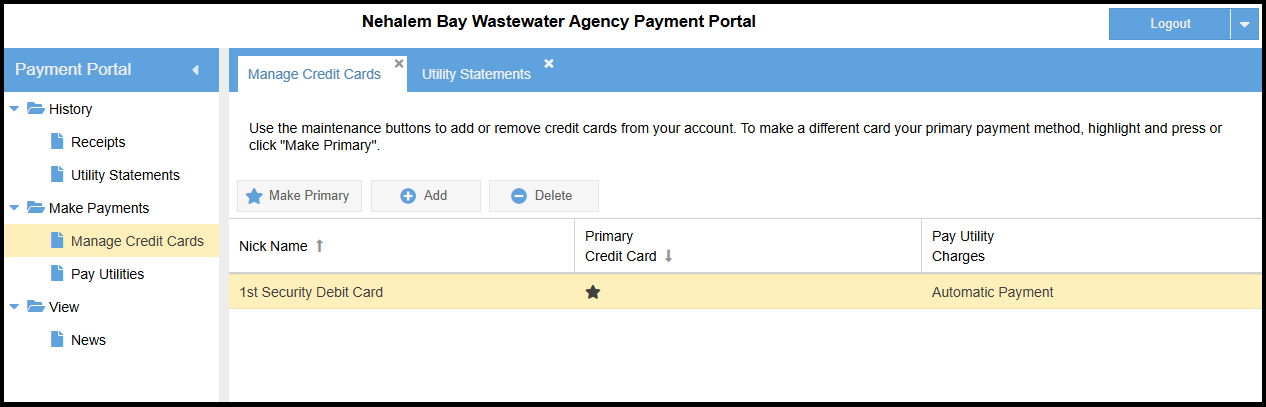
Click Manage Credit Cards. A black star ★ will be under Primary Credit Card and Automatic Payment will be under Pay Utility Charges.
Need help? (503) 368-5125