Pay Your Bill
NBWA Pay Portal by AccuFund
- No fees!
- Live account information
- Autopay Credit/Debit Card only
- One-Time Payments Credit/Debit Card or Bank Account (EFT)
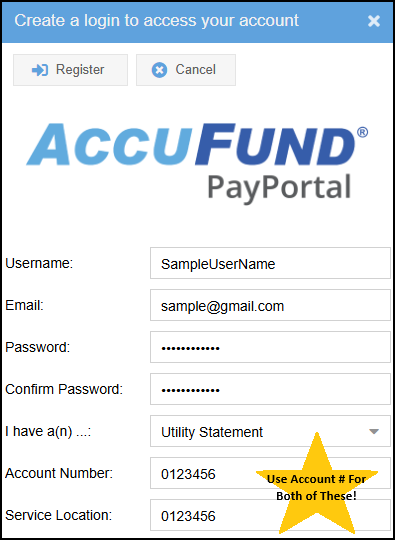
** When registering, 'Service Location' is your 7 digit Account Number **
How To: Register on the Pay Portal
Steps to Register
*When registering, 'Service Location' is your 7 digit Account Number*
- Register
- Username, Email and Password
- Utility Statement
- ACCOUNT NUMBER TWO TIMES; for both the Account Number AND Service Location (7 digit number)
- Register
- Log in with Username and Password
Need help? (503) 368-5125
How To: Setup Autopay on the Pay Portal
Autopay
AutoPay Info
Your first autopay payment will process on the 1st of the following month. No late fees (hooray!) even if the 1st is after your due date. Future payments process quarterly.
Autopay customers do not receive statements. If you receive a statement, your autopay needs attention.
Autopay Set Up
- Click Manage Credit Cards
- +Add Credit Card
- Enter Nickname (optional)
- Important! Click the small circle/bubble next to Pay Automatically
- Next
- Enter card info, click Submit. *Will process on the 1st of each billing month

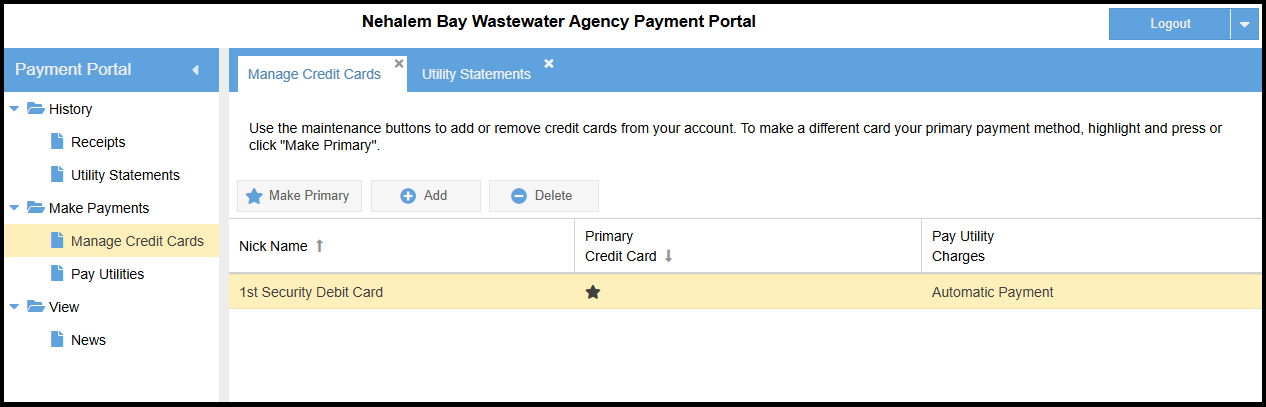
Confirm Autopay Is Working
Click Manage Credit Cards. A black star ★ will be under Primary Credit Card and Automatic Payment will be under Pay Utility Charges
Need help? (503) 368-5125
Other Ways To Pay
Pay Now Link

Pay Now Link by Converge
For an amount other than $90.00, call Nehalem Bay Wastewater Agency (503) 368-5125
- $90.00 plus 3.5% fee
- No account access
- Card information is not saved or stored
Doxo
Doxo
- Fees may apply
- Third party vendor
IMPORTANT! If you switch from Doxo to our pay portal:
- Log in to Doxo and End Doxo's Auto Pay or Remove NBWA from your Doxo account.
- Doxo customer support (206) 319-0097

